
Vidmore Screen Recorder
Mac OS of the Day

Vidmore Screen Recorder

5.0 FREE
  • Screenshot 1
  • Screenshot 2

Description

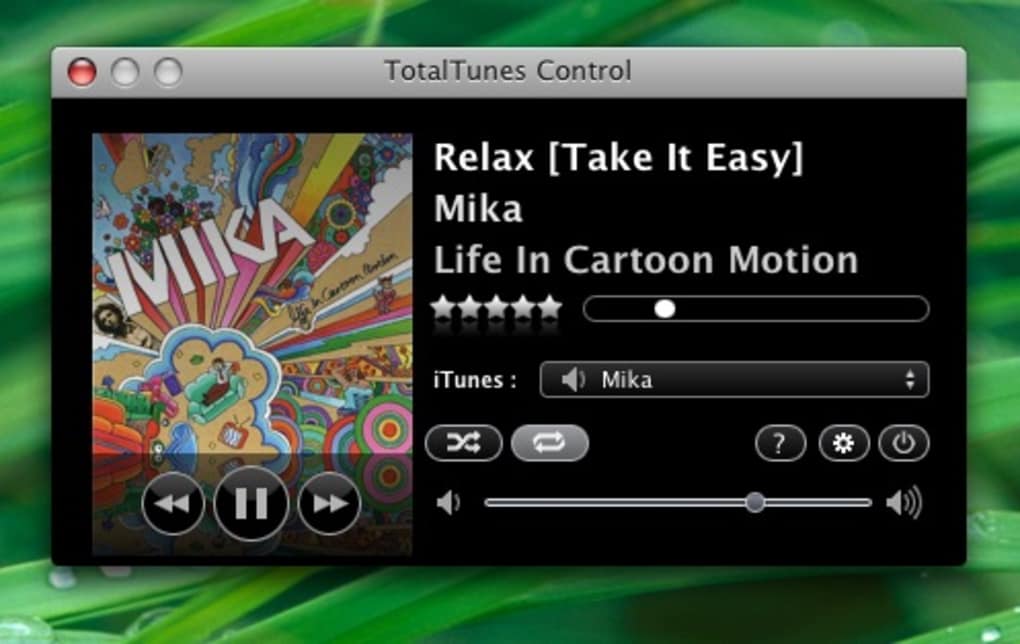
Remote control with hotkeys for iTunes Managing large music collections is never easy. iTunes is one of the best programs out there for this sort of thing but it's not great for controlling music in motion. TotalTunes Control basically gives you total control over your music reproduction in a way iTunes can't. TotalTunes Control sleeps in your taskbar until required when it presents you with a compact window to control everything in iTunes. It can be recalled or closed at any time and crucially, lets you assign keyboard shortcuts for iTunes. The shortcuts consist of the normal play/pause/forward and rewind functions although they are not easily configured. You also get the progress and volume sliders and toggles for repeat and shuffle and a source menu from which you can change between the library and any of the playlists you might have. The main problem is that you have to accept the program's default settings which is not ideal but at least better than what iTunes can offer.

Guides & Tutorials for TotalTunes Control

How to install TotalTunes Control
  1. Click the Preview / Download button above.
  2. Once redirected, accept the terms and click Install.
  3. Wait for the TotalTunes Control download to finish on your device.
How to use TotalTunes Control

This software is primarily used for its core features described above. Open the app after installation to explore its capabilities.

User Reviews for TotalTunes Control 0

    No reviews found

Similar Apps




